
Download
Get the free template files
Use the Excel file when you want to edit the invoice. Use the PDF when you want a lightweight reference copy.
Use this editable contractor invoice template to bill labor, materials, deposits, and project milestones with a more structured customer-facing layout.
Small project invoices, progress billing, deposits, and contractor jobs that need a clear professional format.
Download the file pack, enter your own customer and service data in Excel, and use the styled preview to review the layout before sending.
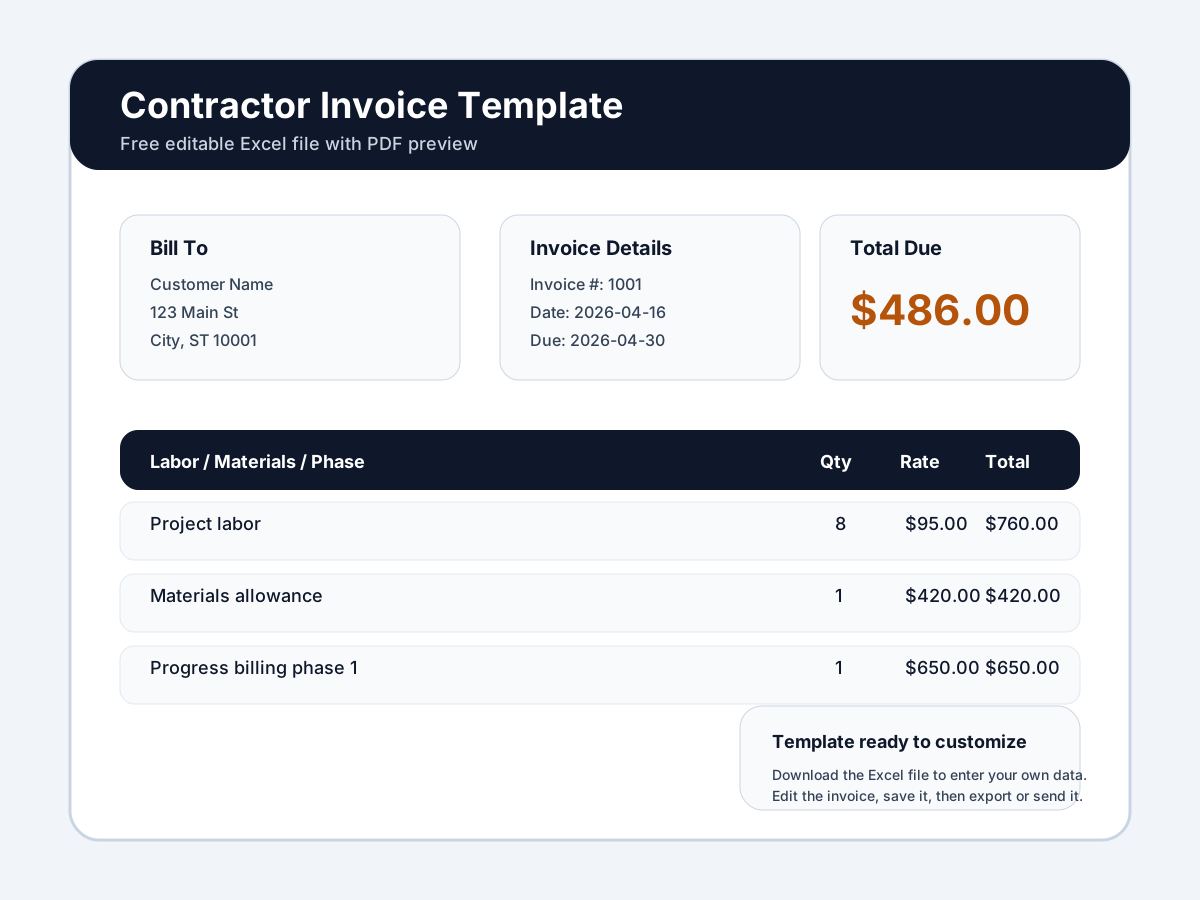
Template Preview
Download note
This is a downloadable editable Excel invoice template. It is not an on-page invoice builder. You customize the file after download with your own business and customer data.
Download
Use the Excel file when you want to edit the invoice. Use the PDF when you want a lightweight reference copy.
Best For
Where manual files get limiting
How To Use It
Download the Excel template and save a clean copy before starting each project invoice.
Add your business details, payment terms, and any standard job references you want to keep visible.
Use separate lines for labor, materials, deposits, and progress billing stages.
Save and export the invoice once each billing stage is ready to send.
Trade Guidance
Contractor invoices benefit from more structure than simple service-call invoices because customers often need to understand phases, deposits, and materials.
Use clearly named stages or scope references if the job is billed over time.
A better invoice format can reduce back-and-forth when customers or office teams review the bill.
Common Mistakes
Upgrade When Ready
A free contractor invoice template is useful when you need a structured file quickly. Service Invoice Pro becomes the better fit once you need estimates, deposits, online payments, invoice tracking, and a cleaner workflow from approved work to billed work.
Compare Your Options
Use the free template now when you need a file you can edit today. Move into Service Invoice Pro when you need invoice sending, tracking, reminders, payments, and a more complete workflow.
| Capability | Free Template | Service Invoice Pro Free | Service Invoice Pro Pro |
|---|---|---|---|
| Editable invoice format | Editable after download in Excel | Create invoices inside the app | Create invoices inside the app |
| Downloadable file | Excel + PDF file pack | Export branded PDFs | Export branded PDFs |
| Manual customization | Manual edits each time | Manual entry in a saved customer workflow | Manual or repeatable workflow setup |
| Invoice sending | Send manually from email/text | Send invoices from the app | Send invoices from the app |
| Invoice status tracking | Track manually | Track sent, viewed, paid, and overdue status | Track sent, viewed, paid, and overdue status |
| Branded PDF workflows | Manual branding in the file | Built-in branded PDF generation | Built-in branded PDF generation |
| Customer record storage | Keep records in spreadsheets/files | Store customers and invoice history in one place | Store customers and invoice history in one place |
| Mobile invoicing | Edit file from a device if supported | Create and send invoices from phone or tablet | Create and send invoices from phone or tablet |
| Reminders | Manual follow-up | Manual follow-up outside the app | Automated reminder workflows |
| Online payments | Add payment instructions manually | No built-in payment collection | Online card and ACH payment collection |
| Recurring invoices | Copy and reuse the file manually | Manual repeat work | Recurring billing workflows |
| Workflow automation and reporting | Spreadsheet-based | Basic invoice workflow foundation | Broader workflow and operations features |
Yes. It is designed to support deposits and staged billing by giving you space to separate those charges clearly.
Usually yes. That makes the invoice easier to understand and helps reduce payment questions on larger jobs.
Software becomes more valuable when your jobs need estimates, approvals, deposits, invoice tracking, and broader project-linked billing workflows.
Free Value First
Get Started
Join landscapers, plumbers, cleaners, and contractors already invoicing for free. No credit card. No time limit.